

Description
One-Click Amazon Product Image Scraper
Overview
AMZScraper is a desktop utility designed to streamline the process of collecting product images from Amazon listings. It enables users to extract and download product images with minimal effort, making it a valuable tool for e-commerce professionals, digital marketers, and product researchers. The software supports multiple Amazon regional domains, allowing for broad market data collection across international platforms.
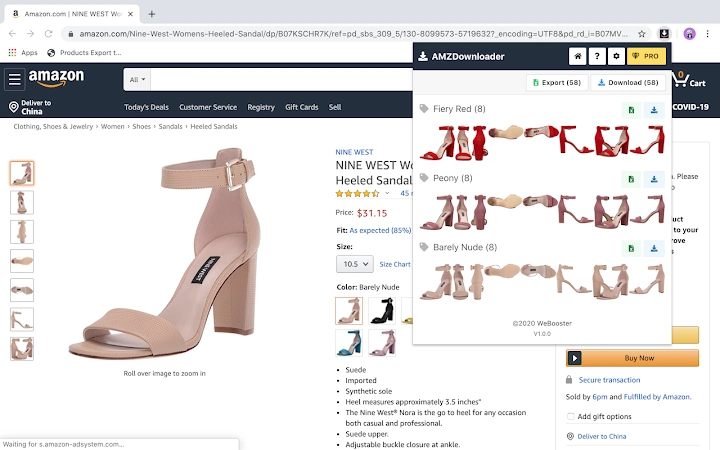
By focusing on image extraction, AMZScraper helps users gather visual content for product comparisons, catalog creation, or competitive analysis without manual browsing. Its core function is to retrieve all images associated with a specific product, including those displayed by color variant, and deliver them in a structured format.
The tool operates as an independent application, not affiliated with Amazon in any official capacity. It functions through browser integration and does not require direct access to Amazon’s backend systems. Instead, it extracts publicly available image URLs from product pages.
Target users include online sellers, content creators, and market analysts who rely on visual data for decision-making. The software is particularly useful when building product databases, preparing listings, or benchmarking competitor visuals across different Amazon regions.
Key Features & Capabilities
- One-Click Image Download – Premium users can download all product images in a single click, saving time during large-scale data collection. Images are bundled into a ZIP file for easy access and organization.
- Image URL Export to CSV – Users can export all image URLs for a product to a CSV file, ideal for integrating into spreadsheets, databases, or automation workflows.
- Color-Based Image Grouping – The tool identifies and separates images by color variant, enabling precise categorization of product visuals based on available options.
- Multi-Region Amazon Support – Compatible with over 15 Amazon marketplaces, including Amazon.com, Amazon.de, Amazon.fr, Amazon.co.uk, Amazon.in, and Amazon.com.au, among others.
- Free Access to Core Features – Basic image download and URL export are available at no cost, making it accessible for casual users and small-scale research.
These capabilities support workflows such as creating visual product comparisons, populating e-commerce catalogs, or analyzing visual trends across different regional markets. The ability to export URLs allows for further automation, while the ZIP export simplifies offline processing and storage.
User Interface, Workflow & Performance
AMZScraper features a minimalistic interface designed for straightforward operation. Users interact with the tool primarily through a browser extension or a dedicated desktop window, initiating actions by selecting a product page and triggering the extraction process.
Navigating the tool involves identifying the target product on Amazon, activating AMZScraper, and choosing the desired action—either download images or export URLs. The workflow is optimized for speed, with minimal steps required to complete a task.
Performance details were not specified by the developer. However, based on the software’s size (1.2 MB) and function, it is expected to operate efficiently with low system resource consumption. The tool does not require extensive processing power, as it relies on parsing publicly available web content.
Stability is assumed to be consistent for standard use cases, though no official reports on crash rates or reliability were provided. The developer did not specify resource usage details, such as CPU or RAM behavior during operation.
Compatibility & System Requirements
AMZScraper is available for both Windows and Mac operating systems, ensuring broad accessibility across desktop environments. The software version is 1.0, with a file size of 1.2 MB, indicating a lightweight installation.
Exact system requirements were not listed. The developer did not provide additional system requirements, including minimum CPU, RAM, or storage specifications. Compatibility information is limited to the supported platforms.
Users are advised to ensure their system meets standard desktop software requirements for running browser extensions and lightweight applications. The tool does not appear to demand high-end hardware, making it suitable for most modern computers.
Pros and Cons
Pros
- Efficient one-click image download for premium users
- Free export of image URLs to CSV format
- Supports 15+ Amazon regional websites
- Lightweight at just 1.2 MB
- Color-based image organization for better categorization
Cons
- Advanced features require a premium upgrade
- No official system requirements provided
- Performance behavior under heavy use not documented
- Dependent on browser settings for automatic downloads
- Not affiliated with Amazon, so usage may carry policy risks
FAQ Section
Is AMZScraper compatible with all Amazon websites?
AMZScraper supports over 15 Amazon marketplaces, including Amazon.com, Amazon.de, Amazon.fr, Amazon.co.uk, and others. While it works on multiple regional sites, full compatibility may depend on site structure and JavaScript rendering.
Is the software safe to use?
AMZScraper is an independent tool that does not access Amazon accounts or personal data. It only extracts publicly available image URLs from product pages. However, users should review Amazon’s Terms of Service, as automated scraping may violate their policies.
How often are updates released?
Update frequency was not specified. The developer encourages user feedback and may release updates based on feature requests or compatibility adjustments.
Does AMZScraper require a license?
Basic functionality is free. Premium features, such as one-click image downloads, require a paid upgrade. The license type and terms were not detailed in the provided information.
Can I use AMZScraper offline?
AMZScraper requires an active internet connection to access Amazon product pages and extract image data. It cannot function without online access to the target websites.
Final Thoughts
AMZScraper delivers a focused and efficient solution for extracting product images from Amazon listings. Its ability to handle multiple regional domains and organize images by color variant makes it a practical choice for e-commerce professionals and researchers. The free access to URL export and basic downloads enhances its accessibility.
While the premium features add significant value, the lack of detailed system requirements and performance data limits full transparency. Users should proceed with caution regarding Amazon’s usage policies, as the tool is unofficial.
For those needing fast, structured access to product visuals across international Amazon sites, AMZScraper offers a streamlined workflow with minimal friction. It stands out as a specialized tool in the growing category of e-commerce utilities.
Download AMZScraper now
Guides & Tutorials for AMZScraper Extension for Chrome
How to install AMZScraper Extension for Chrome
- Click the Preview / Download button above.
- Once redirected, accept the terms and click Install.
- Wait for the AMZScraper Extension for Chrome download to finish on your device.
How to use AMZScraper Extension for Chrome
This software is primarily used for its core features described above. Open the app after installation to explore its capabilities.
User Reviews for AMZScraper Extension for Chrome 0
No reviews found





